
STORM Fooding
At Sionic AI, we utilize a knowledge graph built from team members' preferences and menu/restaurant data to recommend daily lunch menus and efficiently manage orders through Slack.
In this article, we introduce Sionic AI's STORM Fooding project.
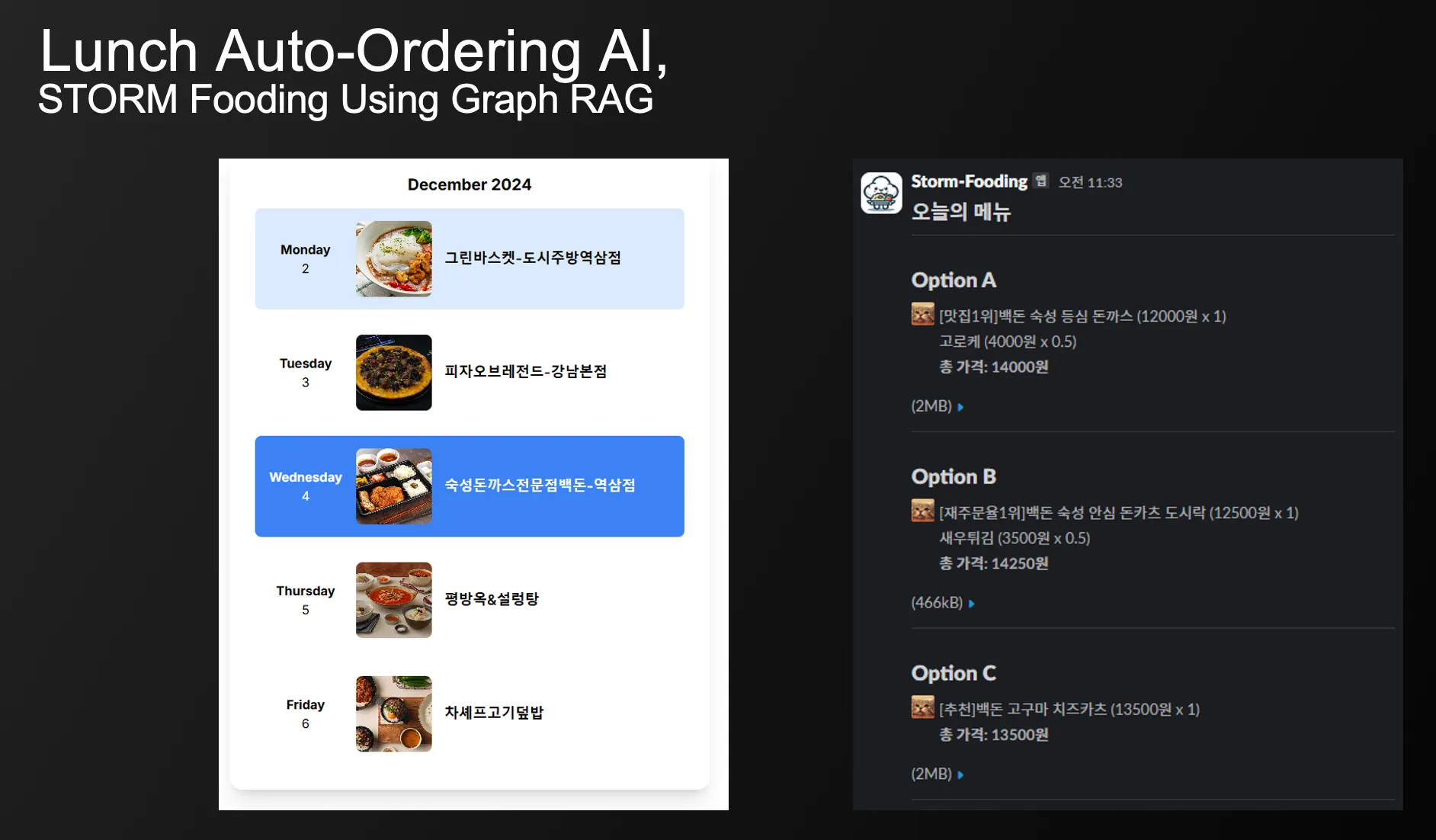
No more lunch delivery starting next week?
The lunch meal subscription service we had been using for a year was terminated due to operational issues on the provider’s side.
While it wasn't completely satisfactory, we had been using the service for a while because the meals arrived at a fixed time every day and food waste disposal was convenient. Despite various inconveniences, it was a workable solution.
So the discontinuation led us to consider creating our own in-house automated food ordering service that better fit the company’s needs.
Background of the STORM Fooding Project
Here are the drawbacks of the lunch meal subscription service we had been using:

•
Due to a fixed restaurant pool, we often ended up eating the same menu items from the same restaurants
◦
This was fine for restaurants we enjoyed, but we also had to periodically eat from unsatisfactory restaurants
◦
Within about six months, we would end up eating the same menu from a restaurant 5-7 times or more, easily getting sick of the menu.
•
No quantity changes or cancellations allowed after 3 PM the previous day
◦
To cancel poorly-rated menu items, we had to check and cancel three days in advance
◦
Unable to flexibly adjust meal quantities based on office circumstances on the day
•
Service fees, 10% VAT, etc., made it more expensive than ordering directly
Based on these concerns, we established the following modification principles.
•
Reflect team members' preferences
◦
Order different menu combinations each time, focusing on well-rated restaurants
◦
Exclude poorly-rated restaurants/menus
◦
Order flexibly according to daily circumstances
•
Conduct demand surveys and menu notifications via Slack the day before
◦
Order quantities based on office circumstances on the day
•
Reinvest saved costs into better meal plans
Considerations for Smart Menu Recommendations - Graph RAG
Initially, we considered the commonly used Rule-Based approach for menu recommendations. However, this method couldn't address the issue of highly-rated places that might have inconsistent food quality or service. Additionally, franchises (fried chicken, pizza, 족발 (pork feet), 마라탕 (malatang), etc.) that frequently run review events tend to be overrepresented, and it's difficult to stay within predetermined meal budgets.
graph TB
    A[Highly-Rated Restaurants]

    subgraph Advantages
        B[Taste Potential]
        C[Popular Selection]
    end

    subgraph Disadvantages
        D[Review Bias]
        E[Franchise Dominance]
        F[Team Preference Issues]
        G[Price Imbalance]
    end

    A --> Advantages
    A --> Disadvantages

    classDef default fill:#f9f9f9,stroke:#333,stroke-width:2px;
    classDef advantageClass fill:#e6ffe6,stroke:#333,stroke-width:2px;
    classDef disadvantageClass fill:#ffe6e6,stroke:#333,stroke-width:2px;

    class A default;
    class B,C advantageClass;
    class D,E,F,G disadvantageClass;
Mermaid
복사
Ultimately, we needed a methodology that could leverage the advantages of ratings while considering team preferences and cost-effectiveness.
Using Semantic RAG, we could convert all reviews into embeddings and store them in a VectorDB for natural language search of reviews. For instance, we could get restaurant/menu recommendations based on keywords like cost-effectiveness, good for hot weather, want to eat again, crispy, etc.
Text to SQL
Alternatively, we could provide LLM with the Data Table Schema and have it write SQL queries.
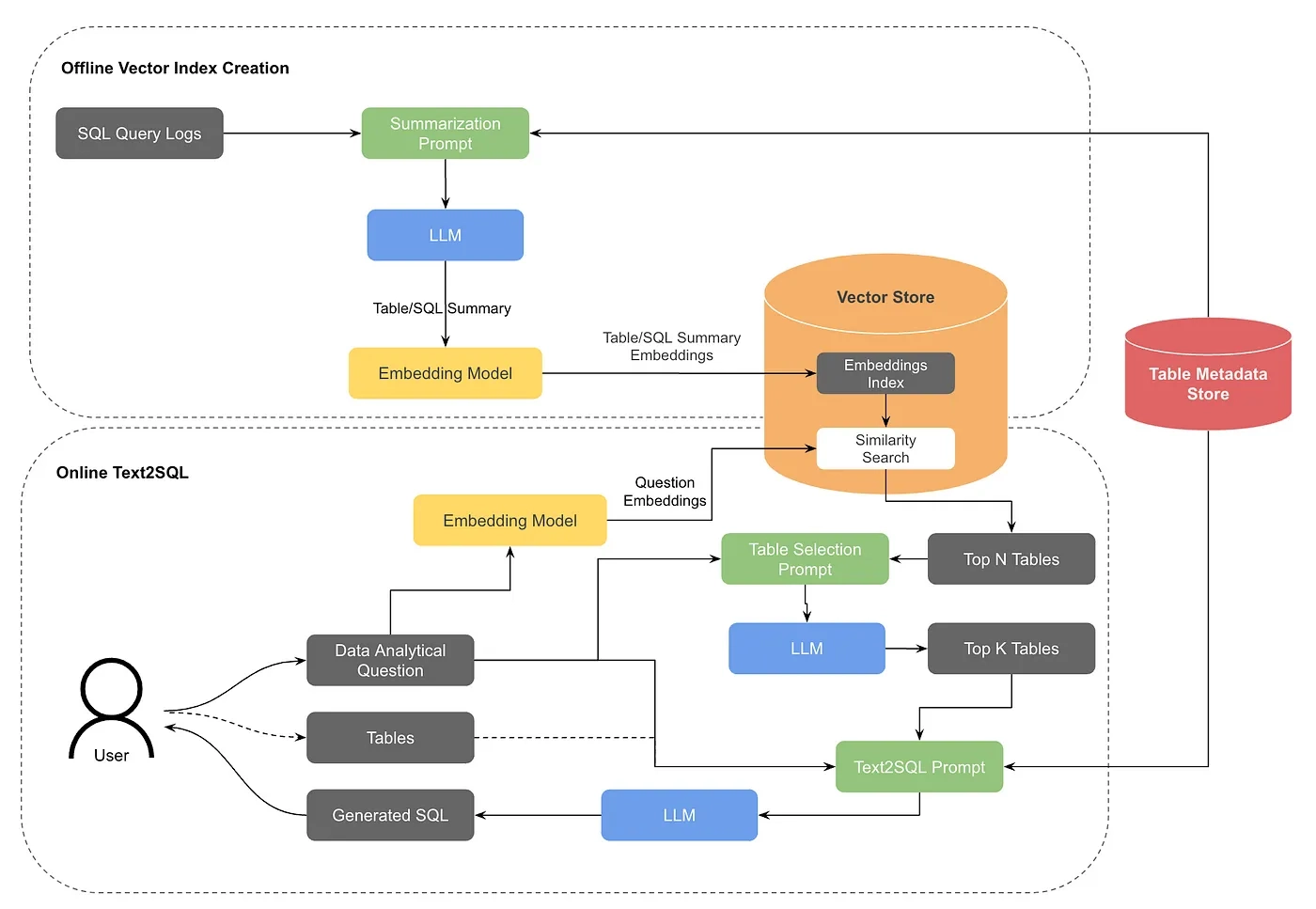
With this method, we could find not only restaurants with the most reviews but also those with the highest proportion of positive best-value reviews, if pre-classified. However, it was still difficult to recommend menus that reflect other team members' preferences.
Graph RAG
Using Graph RAG, which can semantically search reviews and gain insights through data relationships and structures via graphs, might solve our task of finding good restaurants and providing personalized recommendations.
First, thinking about the graph's schema, we can express relationships like this:

[Customer] -:purchases:→ [Menu] -:belongs to:→ [Restaurant]
Since we wanted to clearly distinguish menus and restaurants by category, we structured the schema as follows:
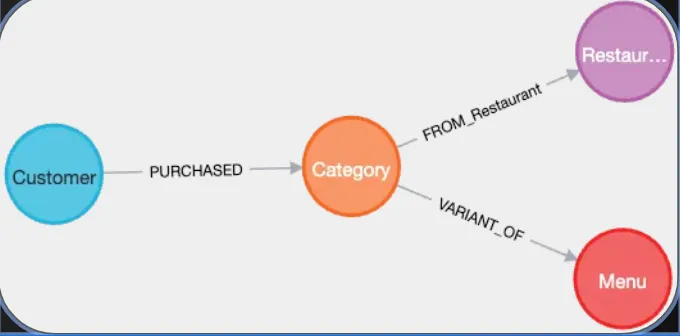
Now when we input the data, we can see the Graph being constructed based on categories.
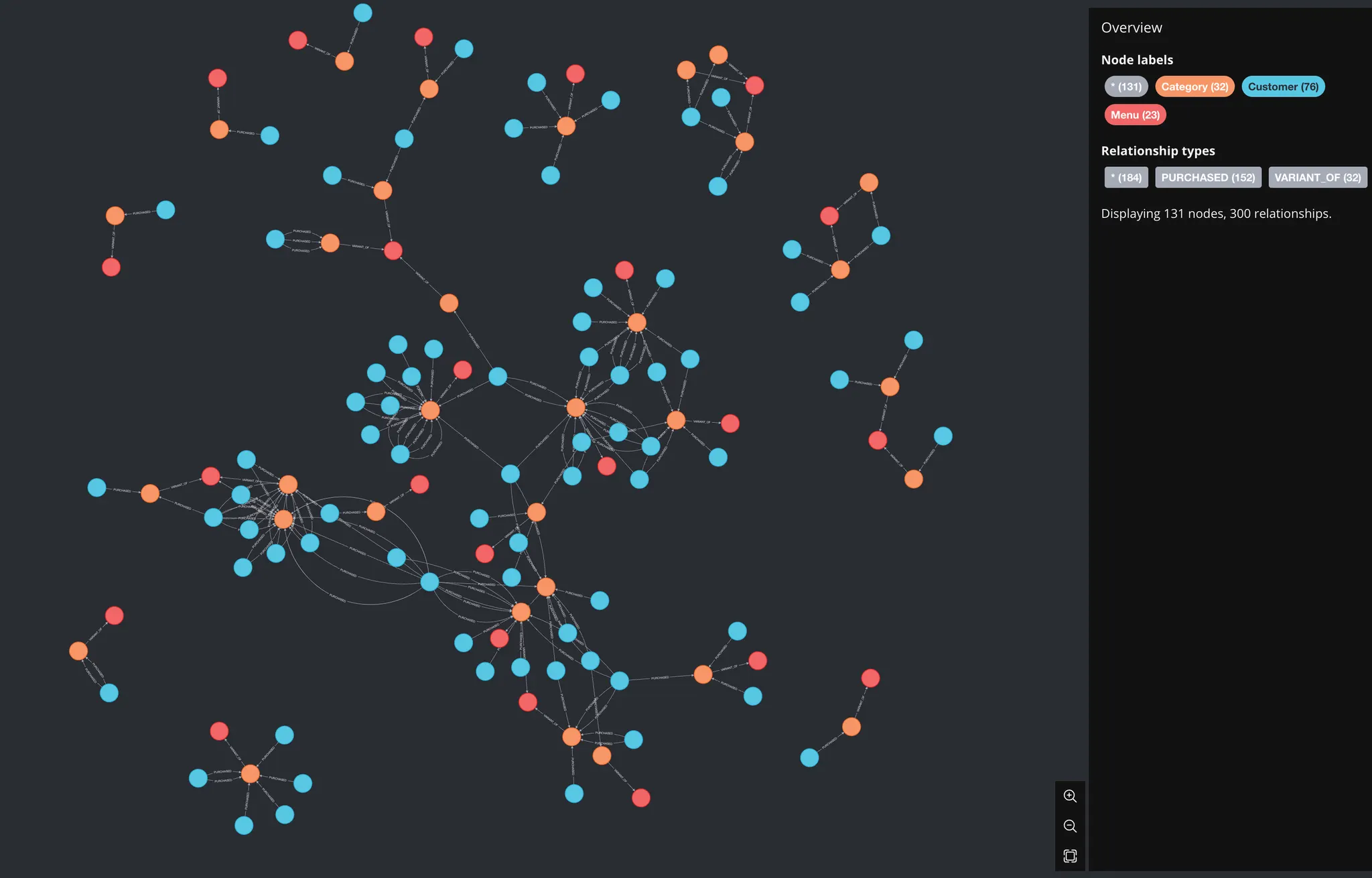
Sample of 150 extracted
# create constraints - one uniqueness constraint for each node label
gds.run_cypher('CREATE CONSTRAINT unique_department_no IF NOT EXISTS FOR (n:Restaurant) REQUIRE n.departmentNo IS UNIQUE')
gds.run_cypher('CREATE CONSTRAINT unique_product_code IF NOT EXISTS FOR (n:Menu) REQUIRE n.productCode IS UNIQUE')
gds.run_cypher('CREATE CONSTRAINT unique_article_id IF NOT EXISTS FOR (n:Category) REQUIRE n.articleId IS UNIQUE')
gds.run_cypher('CREATE CONSTRAINT unique_customer_id IF NOT EXISTS FOR (n:Customer) REQUIRE n.customerId IS UNIQUE')
# load nodes
gds_db_load.load_nodes(gds, department_df, 'departmentNo', 'Restaurant')
gds_db_load.load_nodes(gds, article_df.drop(columns=['productCode', 'departmentNo']), 'articleId', 'Category')
gds_db_load.load_nodes(gds, product_df, 'productCode', 'Menu')
gds_db_load.load_nodes(gds, customer_df, 'customerId', 'Customer')
# load relationships
gds_db_load.load_rels(gds, article_df[['articleId', 'departmentNo']], source_target_labels=('Category', 'Restaurant'),
source_node_key='articleId', target_node_key='departmentNo',
rel_type='FROM_Restaurant')
gds_db_load.load_rels(gds, article_df[['articleId', 'productCode']], source_target_labels=('Category', 'Menu'),
source_node_key='articleId',target_node_key='productCode',
rel_type='VARIANT_OF')
gds_db_load.load_rels(gds, transaction_df, source_target_labels=('Customer', 'Category'),
source_node_key='customerId', target_node_key='articleId', rel_key='txId',
rel_type='PURCHASED')
# convert transaction dates
gds.run_cypher('''
MATCH (:Customer)-[r:PURCHASED]->()
SET r.tDat = date(r.tDat)
''')
# convert NaN product descriptions
gds.run_cypher('''
MATCH (n:Menu) WHERE valueType(n.detailDesc) <> "STRING NOT NULL"
SET n.detailDesc = ""
RETURN n
''')
# create combined text property. This will help simplify later with semantic search and RAG
gds.run_cypher("""
MATCH(p:Menu)
SET p.text = '##Menu\n' +
'Name: ' + p.prodName + '\n' +
'Type: ' + p.productTypeName + '\n' +
'Group: ' + p.productGroupName + '\n' +
'MenuType: ' + p.menuGroupName + '\n' +
'Description: ' + p.detailDesc
RETURN count(p) AS propertySetCount
""")
Python
복사
Node Embedding
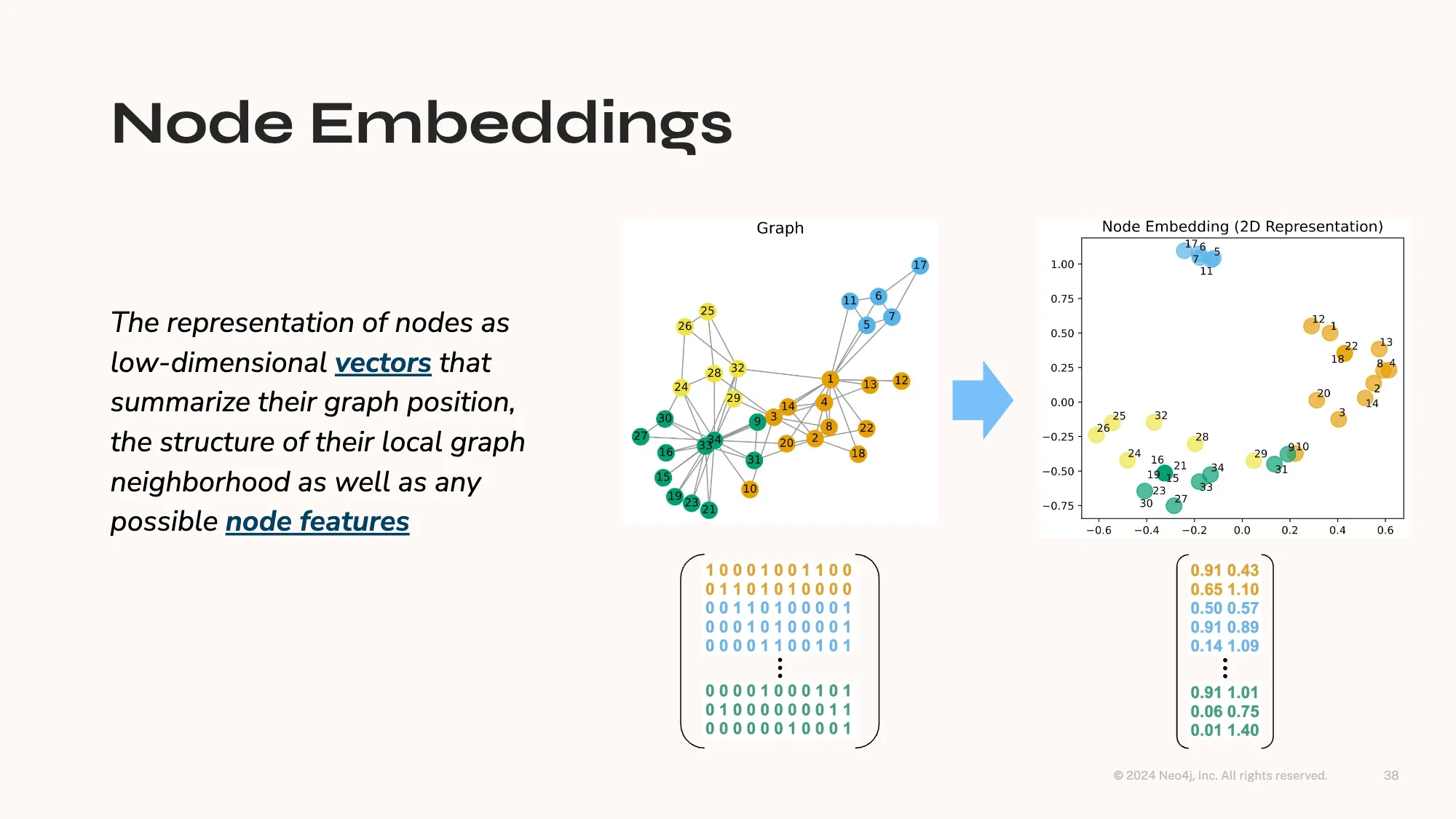
Unlike Semantic Embedding, Node Embedding aims to identify similarities and relationships between nodes by compressing the graph's structure into a lower dimension.
# create FastRP node embeddings
gds.fastRP.mutate(g, mutateProperty='embedding', embeddingDimension=128, randomSeed=7474, concurrency=4, iterationWeights=[0.0, 1.0, 1.0])
Python
복사
Through Node Embedding, we can create relationships between various nodes.
Now, let's create a relationship called CUSTOMERS_ALSO_LIKE.
# graph projection - project co-purchase graph into analytics workspace
gds.run_cypher('''
MATCH (a1:Category)<-[:PURCHASED]-(:Customer)-[:PURCHASED]->(a2:Category)
WITH gds.graph.project("proj", a1, a2,
{sourceNodeLabels: labels(a1),
targetNodeLabels: labels(a2),
relationshipType: "COPURCHASE"}) AS g
RETURN g.graphName
''')
g = gds.graph.get("proj")
# draw KNN
knn_stats = gds.knn.write(g, nodeProperties=['embedding'], nodeLabels=['Category'],
writeRelationshipType='CUSTOMERS_ALSO_LIKE', writeProperty='score',
sampleRate=1.0, initialSampler='randomWalk', concurrency=1, similarityCutoff=0.75, randomSeed=7474)
# write embeddings back to database to introspect later
gds.graph.writeNodeProperties(g, ['embedding'], ['Category'])
Python
복사
First, we retrieve the relationships of users' purchases by Category (such as 낙곱새(spicy intestines and beef soup), 제육볶음 (Stir-fried Pork), 짜장면 (black bean sauce noodles), etc.) and convert them into embeddings.
Then, if the similarity between two Categories is 0.75 or higher, we can create a new relationship called CUSTOMERS_ALSO_LIKE.
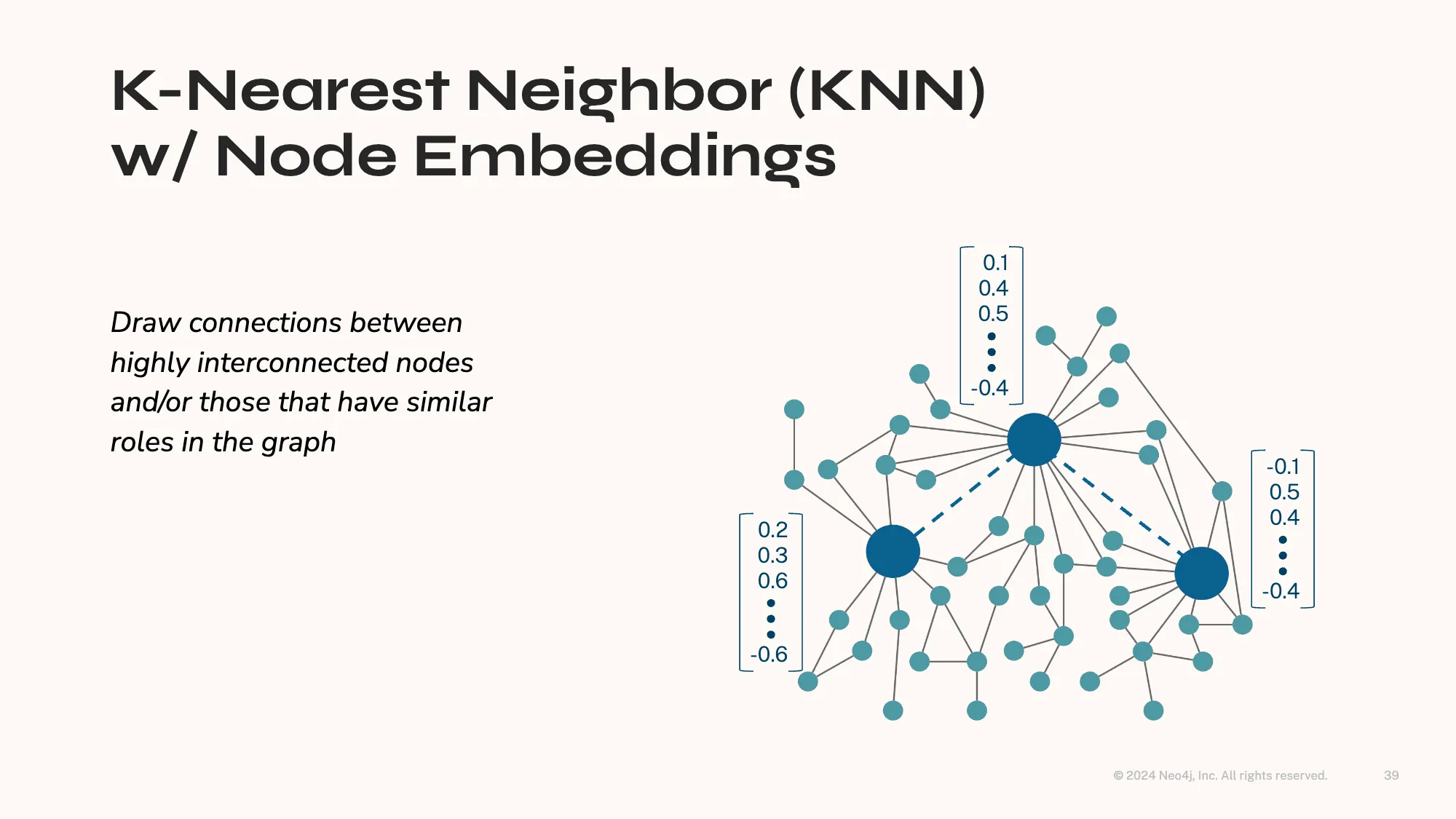
This can give us insights from 'people who order 짬뽕 (spicy seafood noodle soup) Category also order 짜장면 (black bean sauce noodles), 탕수육 (Sweet and Sour Pork) Category'
to 'people who like 마라탕 (Malatang) Category also like 탕후루 (Tanghulu)'.
Not only this, but Semantic Graph Search is also possible, like relationship-based searches.
GraphDB Relationship-based Search
"Finding the best-selling menu at Pizza Hut"
"피자헛에서 가장 많이 팔린 메뉴 찾기"
MATCH (c:Customer)-[:Purchase]->(m:Menu)-[:From]->(r:Restaurant)
WHERE r.name = '피자헛'
RETURN m.name, COUNT(c) as Count
ORDER BY Count DESC
SQL
복사
GraphDB Semantic Search
"Finding menus similar to 차돌 곱도리탕 (Spicy braised beef intestines, brisket, and chicken)"
MATCH (m1:Menu {name: '차돌 곱도리탕'})
MATCH (m2:Menu)
WHERE m1 <> m2
WITH m1, m2, gds.similarity.cosine(m1.embedding, m2.embedding) AS similarity
WHERE similarity > 0.8
RETURN m2.name, similarity
ORDER BY similarity DESC
SQL
복사
"Finding restaurants that are good to eat when it's hot'"
WITH Embedding{'더울 때 먹기 좋은'} AS embedding
MATCH (c:Customer)-[:Purchase]->(m:Menu)-[:From]->(r:Restaurant)
WITH r, COUNT(DISTINCT c) AS customer_count,
AVG(gds.similarity.cosine(m.embedding, embedding)) AS avg_suitability
WHERE avg_suitability > 0.8
RETURN r.name, customer_count, avg_suitability
ORDER BY customer_count DESC, avg_suitability DESC
LIMIT 5
SQL
복사
Question Example
I had meat yesterday and pork belly for dinner
Please recommend something not greasy for lunch today
Global Search Response: ## Lunch Recommendation: Light Meal Options
After having meat dishes yesterday, it's good to choose lighter options for lunch today. Here are several recommendations.
### Noodle Dishes
- **Gildong Udon-Sinsa Station**: This restaurant offering light udon and noodles is a good choice to avoid feeling heavy after eating [Data: Reports (79)].
- **Paldang Naengmyeon-Gangnam Main**: A Korean cold noodle specialist with an average review score of 4.9, showing high customer satisfaction. This could be suitable if you want a light meal [Data: Reports (166)].
### Salads and Healthy Options
- **Everyday Salad-Yeoksam**: Specializes in various salads, suitable for a light lunch [Data: Reports (684)].
- **Greener Salad-Nonhyeon**: Offers healthy salads that can be a light and refreshing lunch choice [Data: Reports (499)].
### Asian Cuisine
- **Vietnam Street Restaurant**: Offers various light Vietnamese dishes, a good choice to avoid heaviness [Data: Reports (691)].
- **Good Sushi-Seolleung**: Specializes in fresh sushi, suitable for a light meal [Data: Reports (506, 837, 476)].
### Korean Options
- **Edubuya Sundubu Jjigae-Gangnam Nonhyeon**: Specializes in tofu dishes, offering lighter options than meat dishes [Data: Entities (2247)].
- **Jjimdak Dujjim-Gangnam Yeoksam**: Offers steamed dishes, suitable as a light Korean meal [Data: Reports (793)].
All these options are suitable for those wanting a light meal and are recommended due to high customer satisfaction. Hope this helps with your lunch choice!
Python
복사
Microsoft's GraphRAG organizes these relationships in advance in the form of Reports and semantically searches through them.
Results
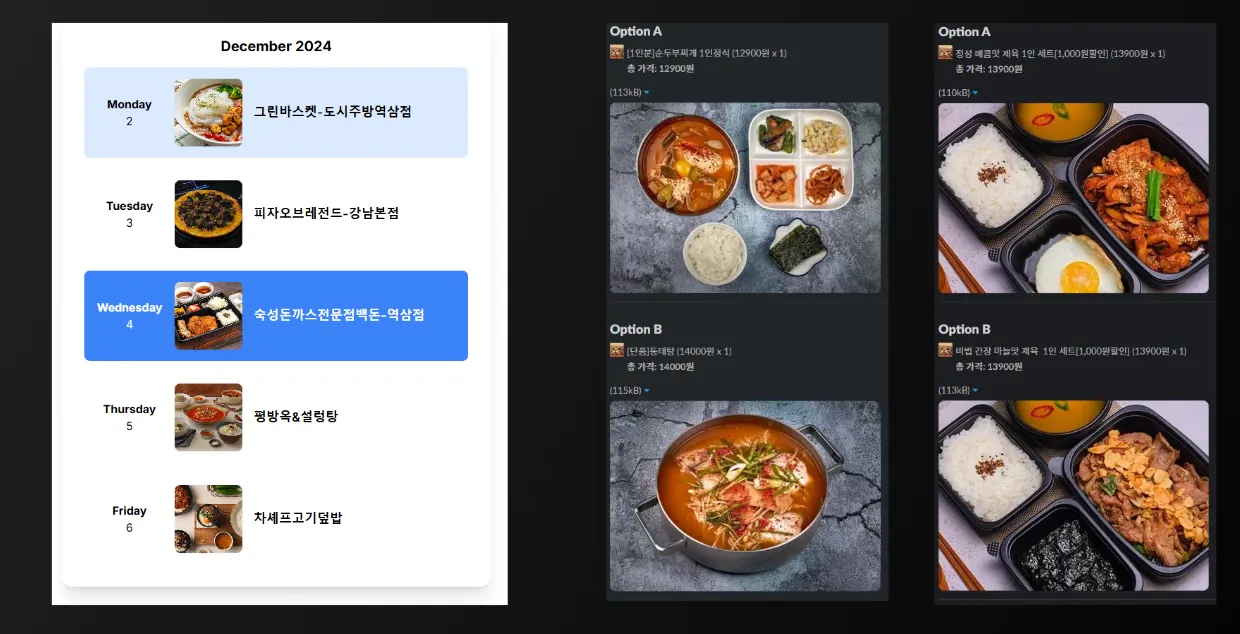
When sufficient data is accumulated in this structure, we can store relationships about "who" ordered "what kind of food" from "where" and "when," as well as their "satisfaction" level.
Todo List
•
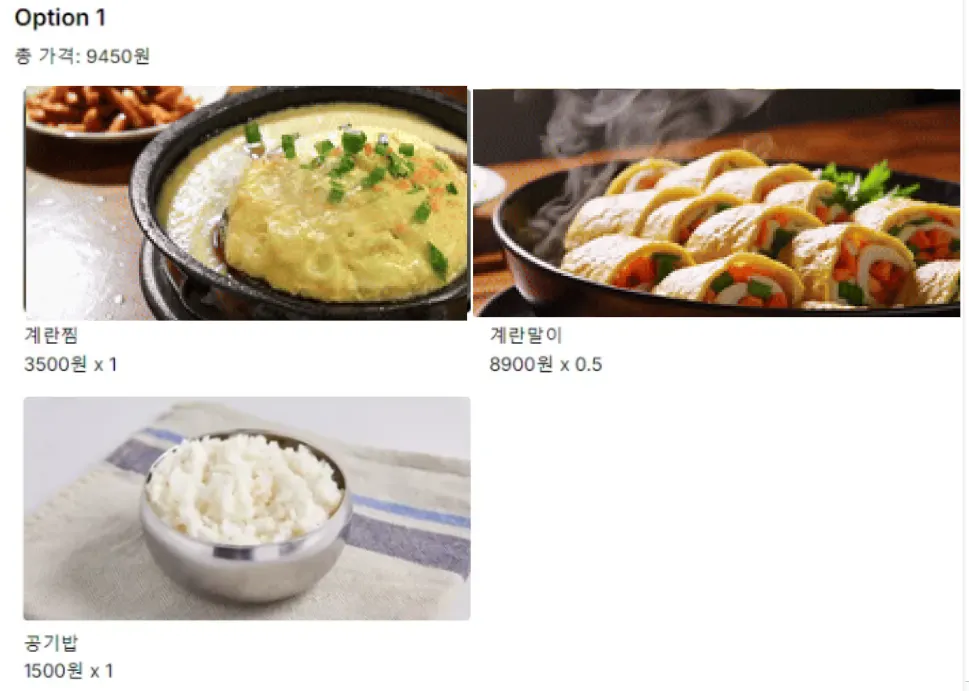
Solve the issue of recommended menus not reflecting employee preferences
•
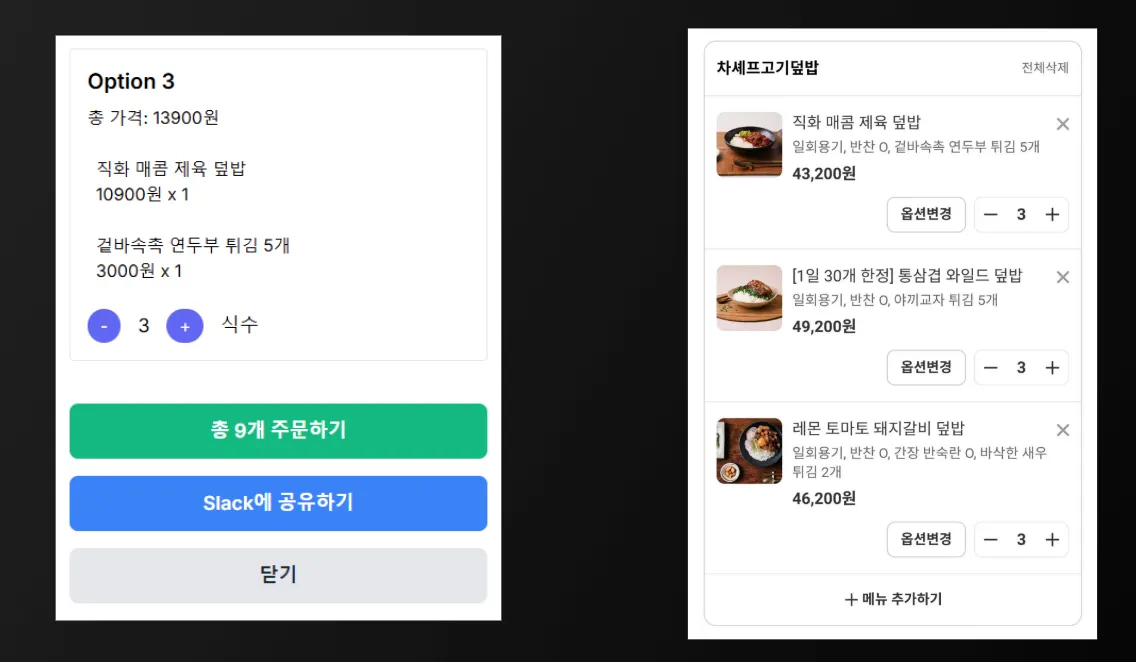
Automate the entire ordering process including payment
Conclusion
Applying AI to solve real business problems is challenging but highly valuable. In this article, we explored how AI can improve everyday work processes through Semantic RAG recommendations in the STORM Fooding service. While there were some failures, we've managed to achieve our initial goals of ensuring cost-effectiveness and diverse menu recommendations. We plan to continuously improve the system based on accumulated data.